

As Shopify stores scale, businesses often need deeper integrations with ERPs, CRMs, inventory systems, fulfillment platforms, and custom dashboards. This is where Shopify APIs and Shopify webhooks become essential.
Understanding how Shopify communicates data in real time allows developers to build powerful, scalable, and secure custom integrations.
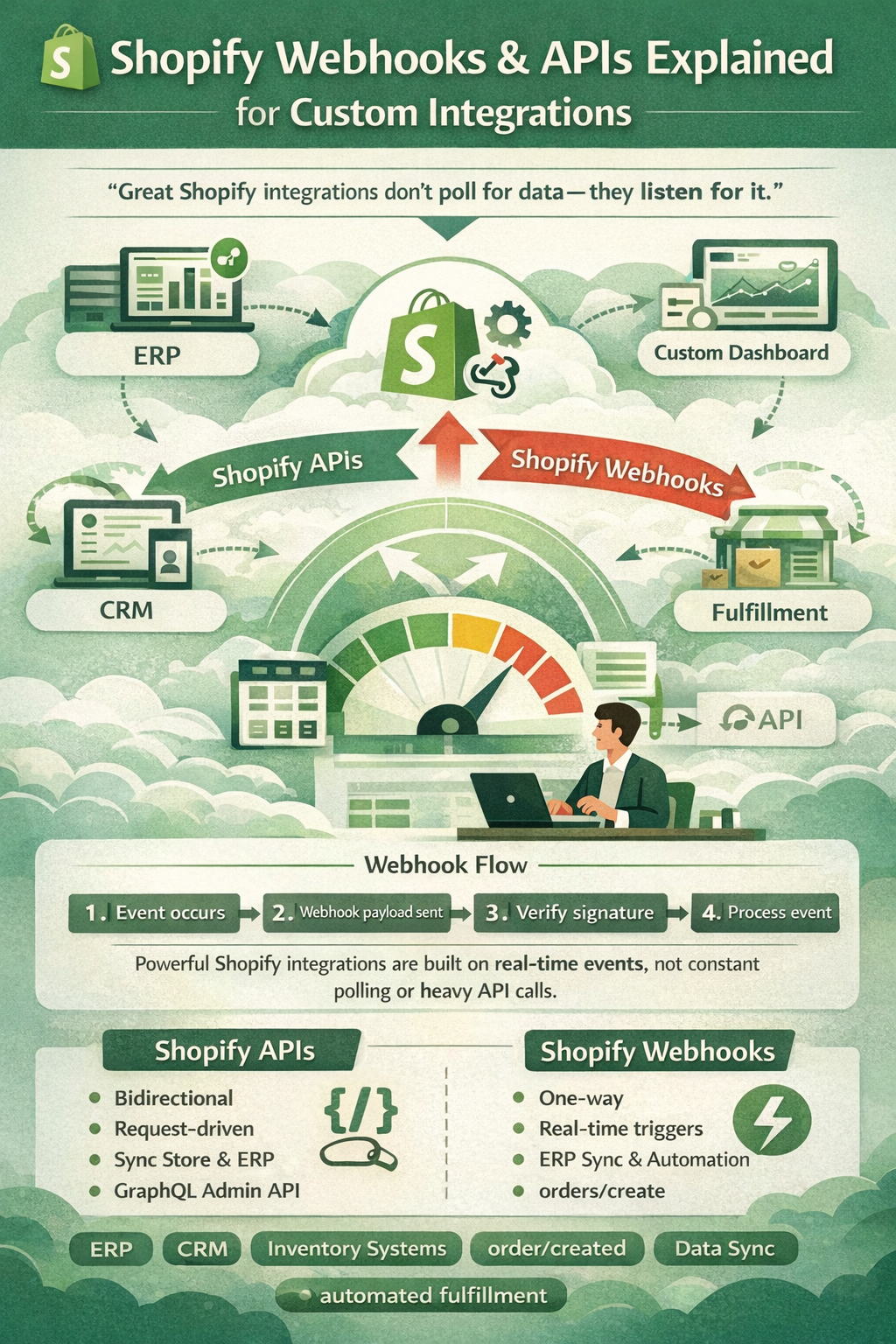
“Great Shopify integrations don’t poll for data — they listen for it.”
What Are Shopify APIs?
Shopify APIs allow developers to interact programmatically with store data such as:
- Products
- Orders
- Customers
- Inventory
- Collections
- Discounts
- Metafields
Using Shopify APIs, developers can read, create, update, and delete data from external systems.
Common Shopify APIs
| API | Purpose |
|---|---|
| Admin API | Manage store data |
| Storefront API | Build custom storefronts |
| GraphQL API | Efficient data querying |
| REST API | Traditional endpoint-based access |
For modern development, Shopify GraphQL Admin API is strongly recommended due to performance and flexibility.
What Are Shopify Webhooks?
Shopify webhooks are event-based notifications sent automatically when something happens in a store.
Instead of continuously checking Shopify for updates (polling), webhooks push data instantly.
Example Events
- Order created
- Order paid
- Product updated
- Inventory level changed
- App uninstalled
- Customer created
This makes Shopify webhooks critical for real-time integrations.
| Feature | Shopify APIs | Shopify Webhooks |
|---|---|---|
| Direction | You request data | Shopify sends data |
| Trigger | Manual or scheduled | Event-based |
| Real-time | ❌ No | ✅ Yes |
| Best use | Data sync & management | Automation & triggers |
Common Custom Integration Use Cases
Developers typically combine Shopify APIs and webhooks for:
1. Order Sync with ERP
- Webhook:
orders/create - API: Fetch full order details
- Sync to ERP or accounting system
2. Inventory Management
- Webhook:
inventory_levels/update - Update warehouse stock in real time
3. Shipping & Fulfillment Systems
- Trigger fulfillment creation
- Update tracking numbers automatically
4. Custom Dashboards
- Centralized reporting across multiple Shopify stores
- Live order and revenue metrics
Shopify Webhook Flow (Developer View)
- Event occurs in Shopify
- Shopify sends webhook payload to your endpoint
- Verify webhook signature
- Process event
- Call Shopify API if additional data is needed
This architecture ensures fast, scalable, and reliable integrations.
Security Best Practices
When working with Shopify APIs and webhooks:
- Always verify HMAC signatures
- Use HTTPS endpoints only
- Store access tokens securely
- Handle webhook retries safely
- Avoid heavy logic inside webhook handlers
“Treat every webhook like untrusted input — security is not optional.”
API Rate Limits & Performance
Shopify enforces API rate limits:
- REST: 2 requests/second
- GraphQL: Cost-based throttling
Best practices:
- Use GraphQL bulk operations
- Cache responses
- Queue background jobs
- Never process large logic synchronously
This ensures stable integrations even during high traffic.
Best Practices for Custom Shopify Integrations
- Use GraphQL Admin API
- Use webhooks for event detection
- Build retry-safe webhook handlers
- Store webhook logs
- Use queues (Redis, SQS, Laravel queues, etc.)
- Separate webhook logic from business logic
This architecture is essential for enterprise-level Shopify apps.
When to Use Shopify APIs + Webhooks Together
✅ Order sync
✅ Inventory automation
✅ Multi-store dashboards
✅ ERP & CRM integration
✅ Custom admin panels
✅ Marketplace integrations
For scalable systems, Shopify APIs and webhooks must work together — not independently.
Conclusion
Shopify webhooks and APIs form the backbone of every advanced custom integration.
For developers, mastering both is essential to building real-time, scalable, and secure Shopify solutions.
Whether you’re building a private app, public app, or custom backend system, the right combination of Shopify APIs and Shopify webhooks ensures performance, reliability, and long-term scalability.
“Powerful Shopify integrations aren’t built with more code — they’re built with smarter events.”